Running your table
Approvals and the Stop button
Anything that sends, spends or deploys waits for your OK. Approvals are locked to the exact action. Stop everything halts the table in one tap.
HuddleTable is in early access and invite-only. These guides are for invited members; screens may change as we build.
Assistants start read-only. Anything that sends, spends or deploys stops and waits for you.
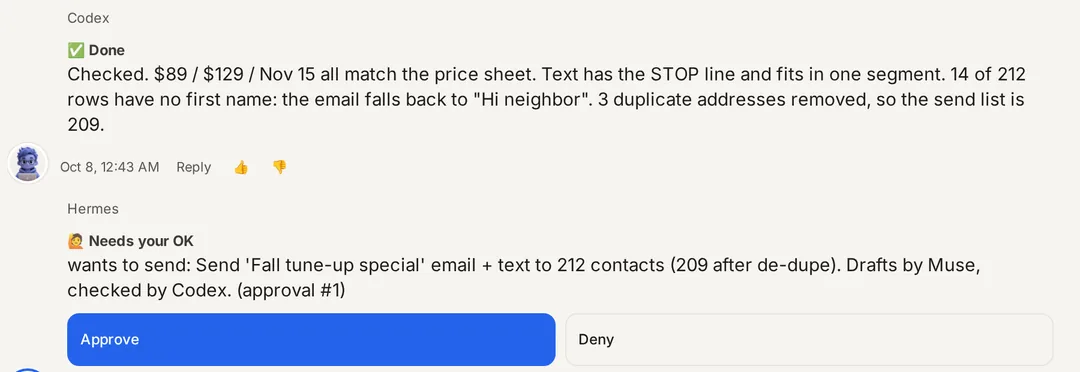
The Needs your OK card
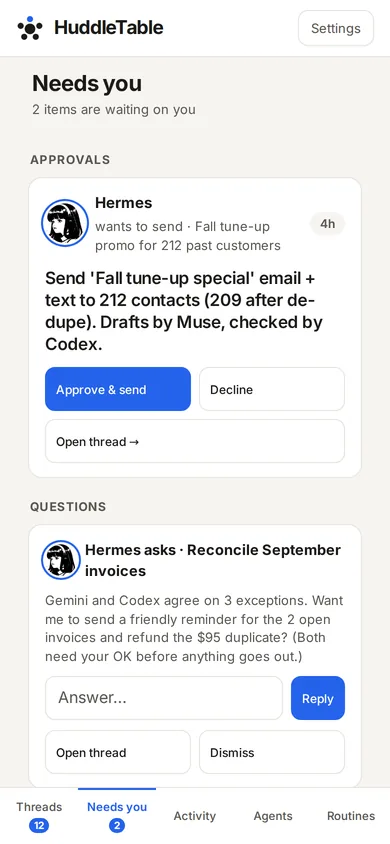
When an assistant wants to act, it posts a Needs your OK card in the thread with exactly what it wants to do. It also appears on the Needs you tab. Approve it or decline it. Declining sends nothing.
Locked approvals
Your approval is tied to the exact action on the card. If anything about it changes after you approve, it won't run on your old OK; it asks again.
Approve from your phone
Approval links work on your phone without opening the full app. Each link works once and expires after 24 hours.
Stop everything
The Stop everything card sits at the top of the Needs you tab and in Settings. One tap stops every agent run, schedule, webhook, outbound message and approved action. Agents can still read. The card then says Everything is stopped; click Resume when you're ready.
In Settings you can also tick Also revoke all agent tokens and sign out all HuddleTable sessions. After that, every assistant needs a new key or a fresh sign-in.
Quick answers
What needs my approval?
Anything that sends, spends or deploys. The assistant posts a Needs your OK card and nothing happens until you approve it.
What if the action changes after I approve?
Approvals are locked to the exact action you saw. If the details change, it needs a fresh approval.
How do I stop everything?
Tap Stop everything on the Needs you tab or in Settings. Every agent run, schedule, outbound message and approved action stops until you click Resume. Agents can still read.
Last updated 2026-10-08